Remote guests have become routine in live production, but the path from invitation to usable broadcast signal is still often split across scheduling tools, consumer calling software, operator chat, return-video systems and separate output hardware. Falcon Live is We Are Falcon's attempt to bring those steps into one operational workflow.
The official product page, updated on 13 September 2026, presents Falcon Live as a browser-based remote contribution system rather than a conventional meeting platform. Guests receive a simple branded link, join without installing an app and wait in a lobby while the production team checks their video and audio. From there, an operator can assign each guest to the required output and continue monitoring the live connection.
A guest link built around the control room
The guest-facing part of Falcon Live is deliberately simple. A production can use a Falcon-managed address such as yourCompany.falconlive.tv, and the product page says a custom domain can also be connected when the broadcaster wants to retain its own branding and DNS ownership. Password protection is listed as an available feature.
Once connected, guests enter a browser client with the studio programme return as the main video window and a compact self-view for checking their framing. Microphone and camera selectors, mute controls, background blur, chat and hang-up remain available in the same interface. That design keeps the contributor's task focused: open a link, choose the correct devices and wait for the production team.
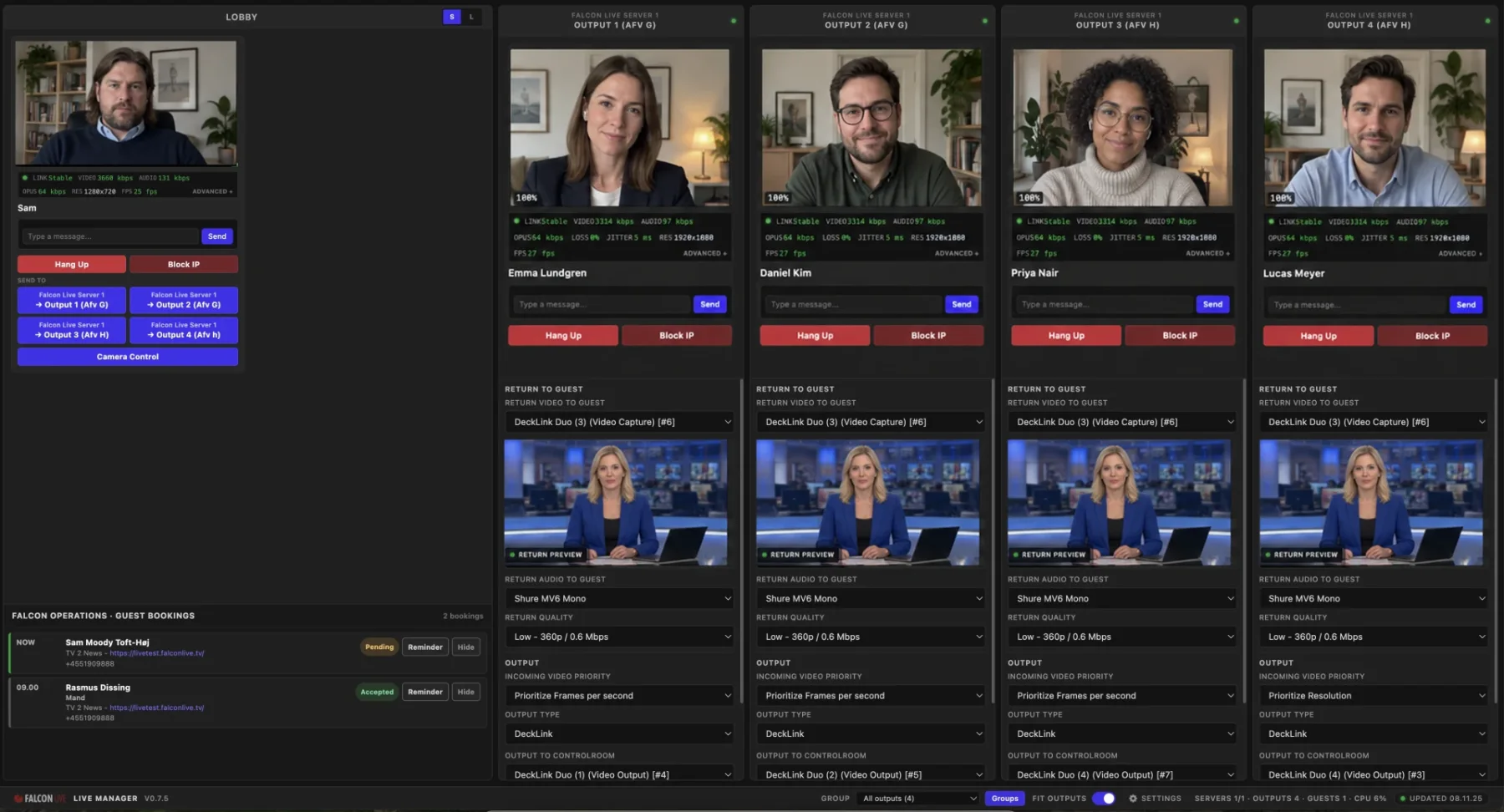
On the other side of the connection, the Live Manager gives the operator a lobby in which remote contributors can be welcomed and checked before they are placed on an output. The official screenshots show multiple guests, technical status information and a shared studio return inside one control surface. Operators can inspect connection health, select the relevant audio and video devices and communicate with guests without moving to a separate messaging tool.
The workflow can start before the guest connects
One of the more consequential additions is the link to Falcon Operations. Upcoming guest bookings can appear in Live Manager with the booking time, production, current status and joining link. That gives an operator a view of who is due next without having to keep a separate production schedule open.
The same booking panel includes an SMS reminder control. If a contributor has not joined, the operator can send a prompt from the Live interface, then receive the guest in the lobby and route them when they are ready. The value is not the reminder alone; it is the removal of a hand-off between scheduling, guest contact and the live technical workflow.
Broadcast routing is the central distinction
Falcon Live's product page places strong emphasis on outputs. Remote clients can be assigned to independent channels, moved between those channels and given their own routing and quality controls. Output options listed by We Are Falcon include DeckLink SDI and NDI streams, allowing a guest feed to enter a conventional vision mixer or an IP-based production environment.
A dedicated client view gives the operator more focused control over a selected guest. On-screen crop and mask handles can be used to refine the framing before the image reaches the output. The same view exposes link health, guest chat, channel routing and the return feed assigned to that contributor. Remote camera control is also included in the official feature list.
This is where Falcon Live differs most clearly from simply opening a video call in a browser. The production operator is not only receiving participants; they are turning each participant into a separately managed source with a defined destination and a known return path.
Programme return stays part of the signal path
A remote contributor needs more than an outbound camera feed. They also need to see and hear the programme context that lets them respond naturally. Falcon Live provides studio return video to the browser client, with the guest's own camera shown separately as a smaller confidence view.
The product page says the programme return remains consistent across guests even while individual outputs retain their own routing and quality settings. In practice, that separation is important: changing where a guest is sent should not also force the production team to rebuild what the guest receives.
One Manager can control several Live Servers
Falcon Live is not presented as a single-server-only system. Several Live Servers can be added to one Live Manager and operated from the same interface. The Manager shows connection state and provides controls for server addresses, channels, output names and whether a given server is enabled.
That architecture gives larger productions a way to expand remote guest capacity without multiplying operator screens. The official page does not publish a maximum server or guest count, so the practical scale will still need to be confirmed for each deployment, but the control model is explicitly designed to extend beyond one Live Server.
Falcon-managed and custom domains
For teams that want to get online quickly, We Are Falcon offers a managed falconlive.tv address. Productions that need their own domain can instead use a custom Cloudflare setup. The Manager and each Live Server retain separate Cloudflare Tunnel configuration, giving the team a choice between the managed route and its own domain arrangement.
This is partly a branding decision, but it is also operational. A stable, recognisable guest URL reduces the risk of distributing different meeting links for every contribution, while a custom domain can keep the guest journey within the broadcaster's own identity.
How Falcon Live fits into the wider Falcon workflow
The confirmed integration on the product page is with Falcon Operations, where guest bookings and production timing originate. Falcon Live then takes over the immediate contribution workflow: reminder, browser entry, lobby, technical check, return feed and output assignment.
That connection illustrates the product's broader direction. Rather than treating a remote interview as an isolated call, Falcon Live treats it as a scheduled production resource that has to be prepared, monitored and delivered into a professional signal chain.
What the official page does not yet specify
The available product material confirms the workflow and named features, but it does not publish measured end-to-end latency, a supported-browser matrix, maximum concurrent guest counts, supported DeckLink models, the NDI version, minimum network requirements or a documented redundancy model. Those details can materially affect a live deployment.
We Are Falcon directs prospective users to book a demo. Broadcasters evaluating the system should use that session to test their actual guest devices, network conditions, audio return and production hardware, and to confirm capacity and licensing for the intended configuration.
Why the product matters
The hardest part of remote contribution is rarely the existence of a video connection. It is the collection of small operational tasks around it: knowing who is due, reaching them, checking their devices, keeping them informed, giving them the right return, framing the picture and delivering the feed to the correct output.
Falcon Live brings those tasks into a workflow shaped for the gallery rather than for the meeting room. Its promise is straightforward: keep the guest experience simple in the browser while giving the production team the scheduling context, routing and control expected in a professional broadcast environment.